Autoflex integration
Parts iQ + Autoflex: compare parts straight from your work order
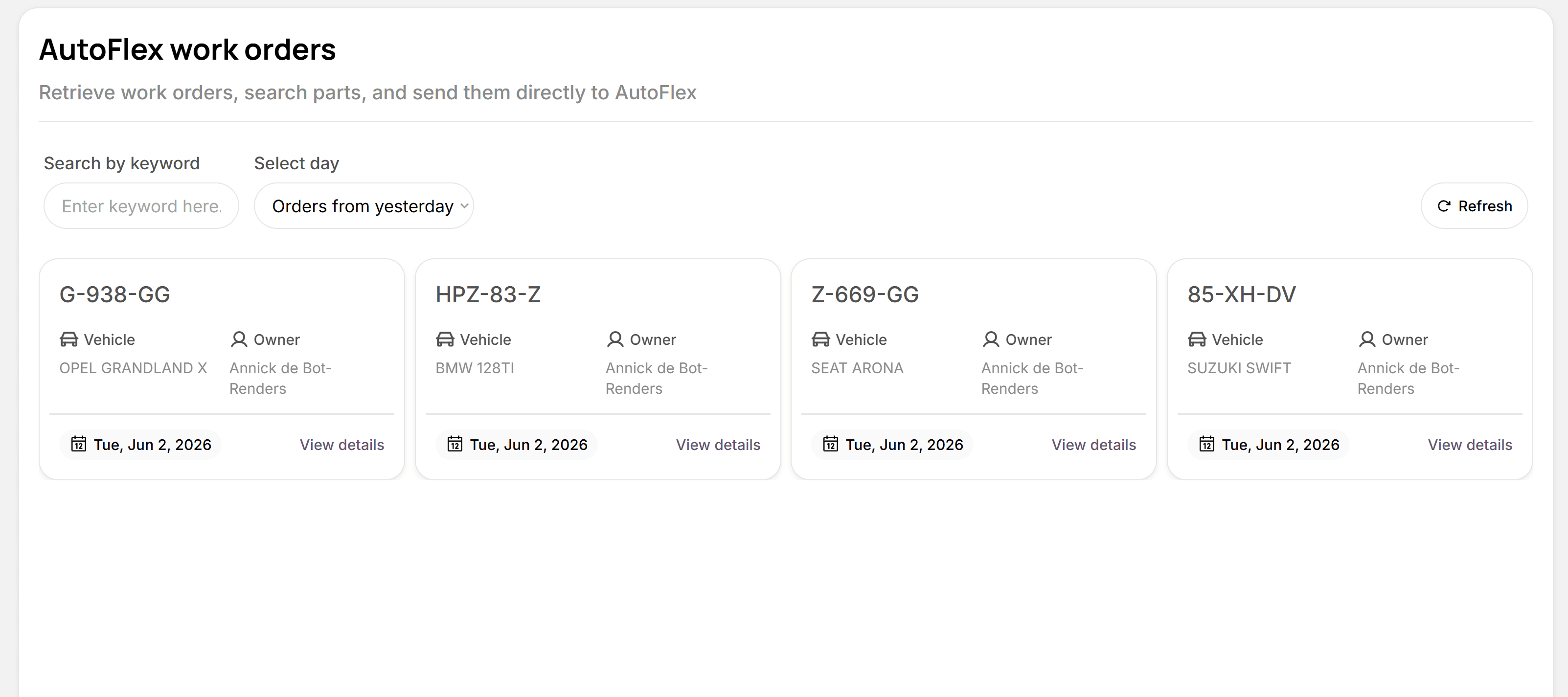
With the open API integration, your Autoflex work order lines are available in Parts iQ. One search compares all your wholesalers on price, delivery time and stock, and the chosen part goes back to Autoflex at the right selling price.

Open API integration
Autoflex and Parts iQ exchange work orders and order lines directly, with no retyping.
Optional, alongside your workflow
Switch the integration on whenever you like. Existing wholesaler integrations and purchasing agreements in Autoflex stay unchanged.
For around 2,500 Autoflex users
Every independent garage that runs Autoflex can connect Parts iQ to its existing software.
How the integration works
- 1
Connect Autoflex
Switch on the integration in Parts iQ. Your work orders and their order lines are pulled in from Autoflex.
- 2
Pick a work order
Select the work order you need parts for. Its order lines are already there.
- 3
Compare all your wholesalers
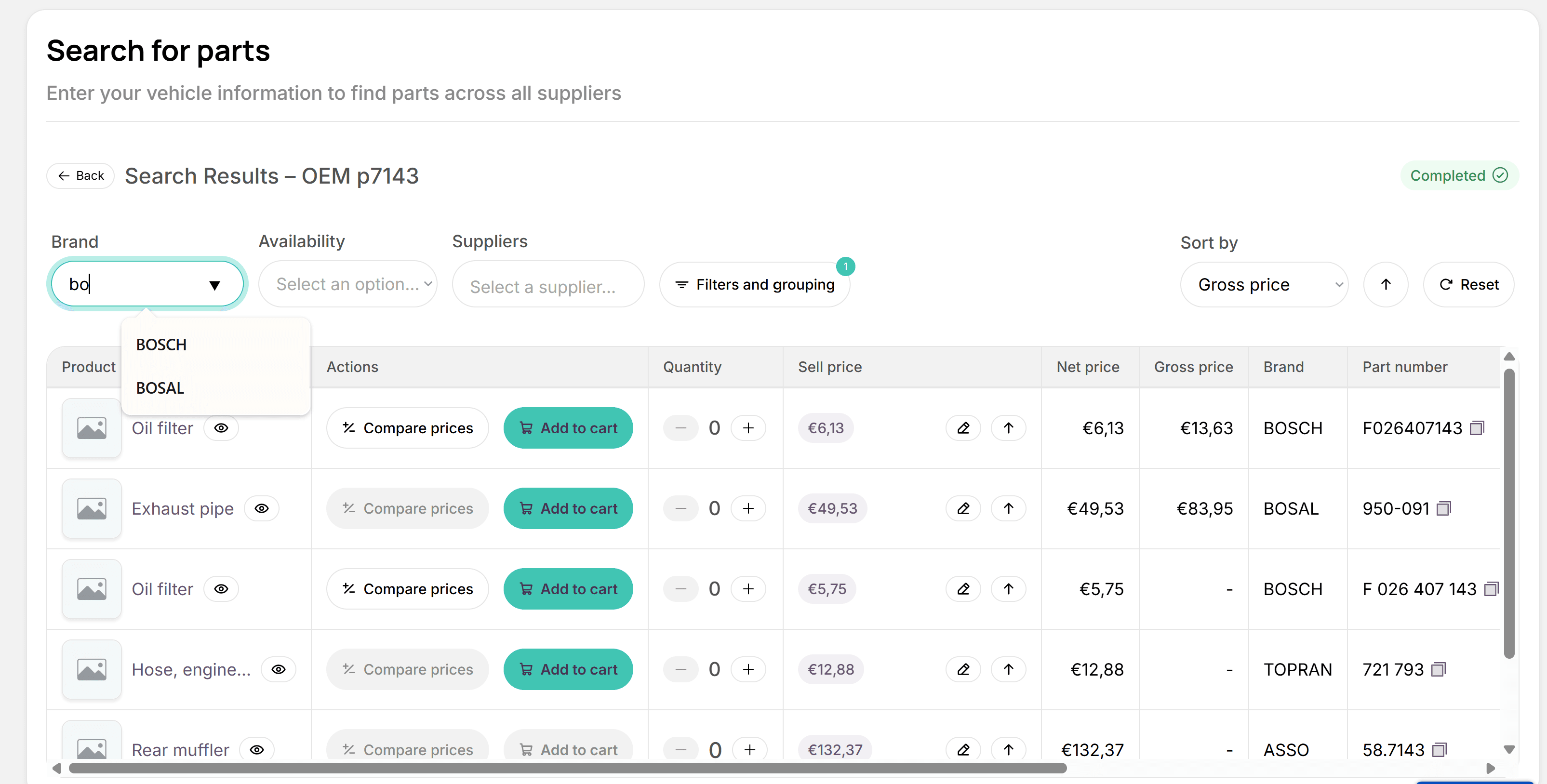
Parts iQ searches all your connected wholesalers at once and puts price, delivery time and stock side by side.
- 4
Back to Autoflex
Choose the best offer. The part lands on the work order's order line at the right selling price, and you order through your own wholesaler account.
What it does for your workshop
No more separate portals
One search instead of logging in and searching at every wholesaler separately.
Always the right selling price
Your own margin settings are applied before the part goes back to Autoflex.
Less retyping, fewer mistakes
Part numbers and prices go straight onto the order line, no copy and paste.
Your agreements stay in place
Orders go through your own account, so your purchasing terms with your wholesalers still apply.
Overview of open order lines
Parts iQ shows which Autoflex order lines still need to be ordered.
You stay in control
Parts iQ doesn't steer you to any wholesaler. It gives you insight; the choice is yours.
Search from your trusted catalogue
Prefer working in a catalogue such as Meca, LKQ or Parts360? Pick your Autoflex work order in the Parts iQ browser extension and scan the whole page, or select just the parts you need. Parts iQ recognises the part numbers and lines up the searches on the right work order.
- Scan the whole page or make a selection
- Works with part numbers and OE numbers
- Searches appear on the work order in Parts iQ straight away
Compare across all your wholesalers
From your Autoflex work order, Parts iQ searches wholesalers including these.
- Molco

- Parts360

- WM Automaterialen

- LKQ

- RA Parts

- Brightmotive

Frequently asked questions about the Autoflex integration
What do I need to use the Autoflex integration?
An Autoflex environment and a Parts iQ account. You can try Parts iQ free for 30 days first; we'll help you switch the integration on.
Does anything change in my existing wholesaler integrations in Autoflex?
No. The integration is optional and sits alongside your current workflow. Your wholesaler integrations and purchasing agreements in Autoflex stay unchanged.
What goes back to Autoflex?
The part you choose, at the selling price based on your own margin settings, is added to the order line of the work order in Autoflex.
Which wholesalers can I search?
Currently Molco, Parts360 (PartsPoint), WM Automaterialen, LKQ, RA Parts and Brightmotive. You always order through your own account, so your purchasing terms still apply.
What does the integration cost?
The Autoflex integration is part of Parts iQ. See the pricing page for current plans; you can try it free for 30 days.
Does Parts iQ work with other garage software?
Integrations with other garage management systems are in development. Let us know which system you use.
Do you use Autoflex?
Book a demo and see how easy it is to compare parts straight from your work order.
Book a demo